msgbox
Description
The msgbox command shows a Windows message box with the specified text.
Use msgbox in scripts when you need to display a simple notification or checkpoint message to the user.
Syntax
msgbox -value message [-title title] [-icon icon]
Parameters
value:
(Required) Message text to display in the message box.title:
(Optional) Message box title. If omitted, PDMShell uses the current PDMShell version as the title.icon:
(Optional) Message box icon. Valid values areNone,Information,Warning,Error, andQuestion. If omitted, PDMShell usesInformation.
Visual Editor
In the visual editor command builder, the icon parameter is shown as a single-select combo box with the supported icon values:
NoneInformationWarningErrorQuestion
Placeholders
The value and title parameters support session placeholders. PDMShell evaluates placeholders before showing the message box, so you can display values from the current session in the message text.
For example, after logging in to a vault, $vaultName resolves to the active vault name:
msgbox -value "vaultName = $vaultName" -icon "Information"
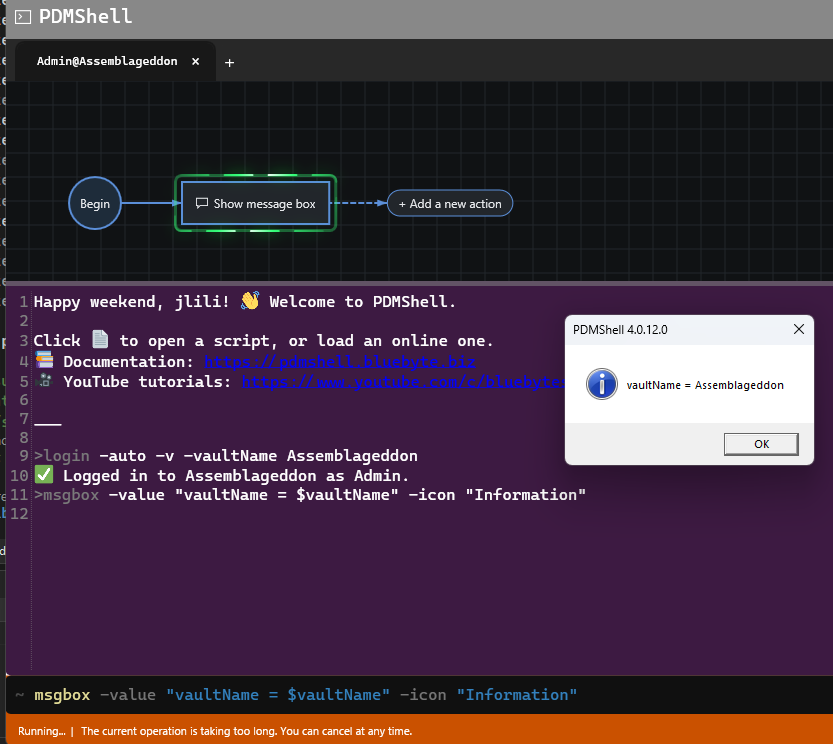
Common session placeholders include $vaultName, $date, $time, $guid, and $tempFolder.
Examples
msgbox -value "Hello from PDMShell"
msgbox -value "Script completed successfully." -title "Batch Complete" -icon Information
msgbox -value "The export failed." -title "Export Error" -icon Error
Remarks
- The command displays an informational Windows message box.
- When
titleis not specified, the message box title defaults to the PDMShell version. - When
iconis not specified, the message box uses theInformationicon. - Wrap the value in quotes when the message contains spaces.
- Wrap the title in quotes when it contains spaces.
- The script continues after the user closes the message box.
Availability
Available since PDMShell 4.0.8.
Last Updated
Updated in PDMShell 4.0.14 so value and title support session-level placeholders such as $vaultName, $date, $time, $guid, and $tempFolder.